Your Tools Don't Talk to Each Other
A customer scans your QR code and books an appointment. Now you need to manually add them to your CRM. Then update your Google Sheet. Then notify your team on Slack. Then add them to your email list. Four tools, four manual steps, every single time.
With webhooks, ElkQR talks directly to your other tools. When something happens - a scan, a booking, a feedback submission - ElkQR instantly sends the data to any URL you configure. Your Zapier automation adds them to your CRM. Your Pabbly workflow updates the spreadsheet. Your custom server notifies Slack. Zero manual work.
Connect ElkQR to Zapier, Pabbly, Make, n8n, or your own server. Get real-time data when events happen.
What You Can Automate
Choose exactly which events trigger webhooks. Subscribe to what matters, ignore the rest:
| Category | Events Available |
|---|---|
| QR Code | Scanned, Created, Updated, Deleted, Activated, Deactivated, Restored, Permanently Deleted, Scan Limit Reached |
| VCard | Contact Saved, Phone Clicked, Email Clicked, WhatsApp Clicked, Social Clicked, Website Clicked |
| Booking | Created, Updated, Cancelled |
| Feedback | Submitted |
| Team | Member Invited, Member Joined, Member Removed, Role Changed |
| Bulk Operations | Started, Completed, Failed |
| Custom Domain | Added, Verified, Deleted |
Real Automation Examples
| When This Happens | Webhook Can... |
|---|---|
| QR code scanned | Add visitor to CRM, update Google Sheet, trigger SMS notification |
| Booking created | Create calendar event, send custom confirmation, add to email sequence |
| Feedback submitted | Post to Slack channel, create support ticket, update analytics dashboard |
| VCard contact saved | Add lead to HubSpot, trigger nurture campaign, notify sales team |
| Scan limit reached | Alert marketing team, update campaign status, trigger follow-up workflow |
| Team member joined | Send welcome email, add to onboarding sequence, notify team lead |
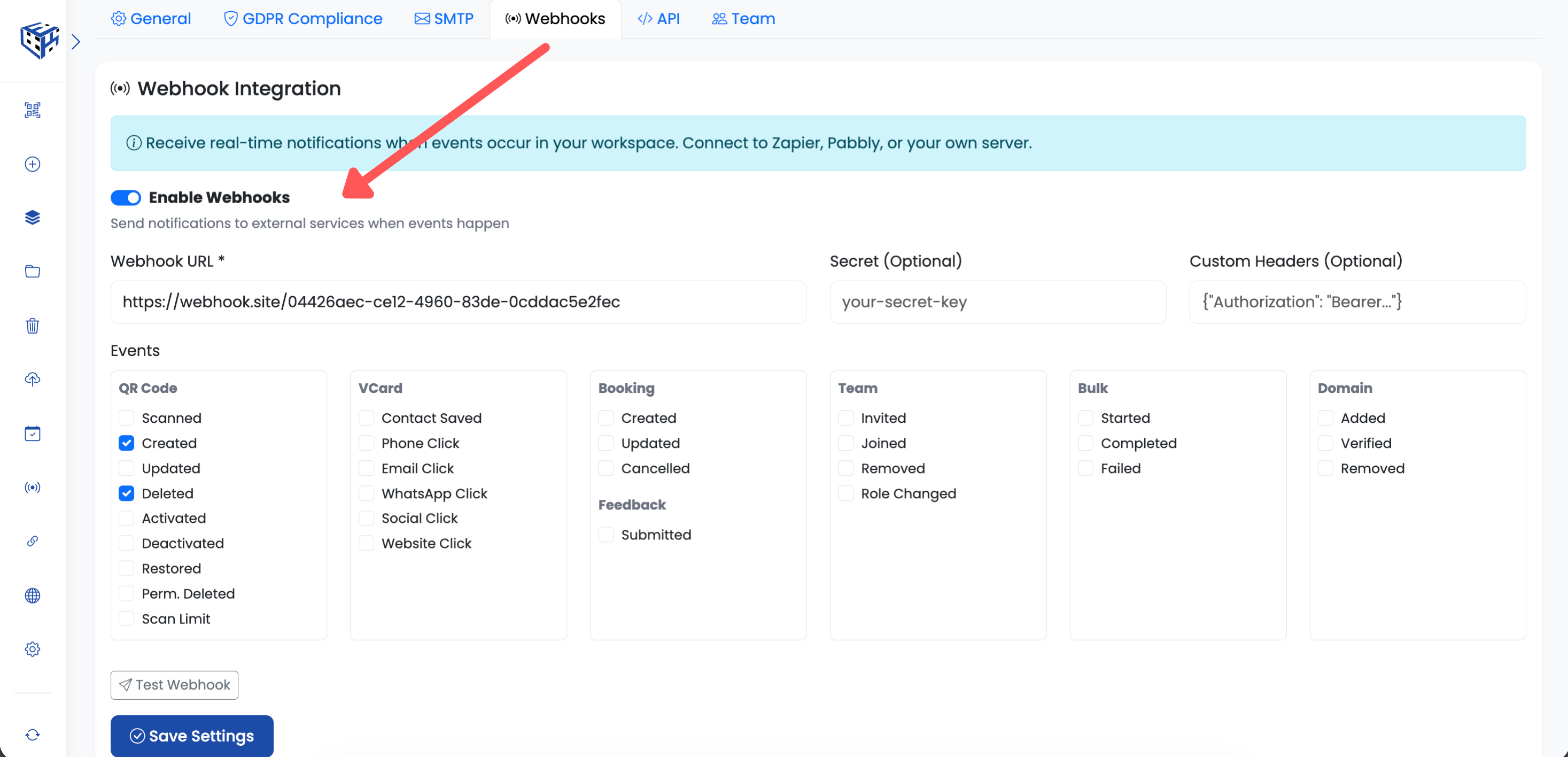
How It Works
- Go to Workspace Settings → Webhooks tab
- Toggle 'Enable Webhooks' on
- Enter your webhook URL (Zapier, Pabbly, or your own endpoint)
- Select which events should trigger webhooks
- Click 'Test Webhook' to verify it works
- Save settings - you're live
Security Options
Protect your webhook endpoint with built-in security features:
| Feature | What It Does |
|---|---|
| Webhook Secret | Signs every request with HMAC-SHA256 signature. Verify requests are really from ElkQR. |
| Custom Headers | Add Authorization headers, API keys, or any custom headers your endpoint requires. |
Compatible Platforms
ElkQR webhooks work with any platform that accepts HTTP POST requests:
- Zapier - Connect to 5000+ apps
- Pabbly Connect - Budget-friendly automation
- Make (Integromat) - Visual workflow builder
- n8n - Self-hosted automation
- Your own server - Full control with custom code
Tip
Use the 'Test Webhook' button before going live. It sends a sample event so you can verify your endpoint receives and processes data correctly.
Tip
Webhooks apply to all QR codes in the workspace. If you need different webhook destinations for different campaigns, create separate workspaces.
Still facing difficulties?
Click here to contact our support team for assistance